Introducing conda-workspaces

Image credit: Ahimsa - OM on Pexels
Earlier this month, Dan Yeaw described his vision for a better conda CLI in Building a Better conda CLI: A Vision: declarative project environments via conda.toml, a workspace-aware CLI, and reproducible cross-platform locks shipped as part of conda itself. conda-workspaces 0.4.0 ships today as a concrete step in that direction.
The workspace model itself comes from pixi by prefix.dev, where one TOML manifest declares a project's environments, features, platforms, and tasks. conda-workspaces is a conda plugin that brings that model to conda: it reads the same conda.toml, pixi.toml, or pyproject.toml manifest, materializes each declared environment as an ordinary conda prefix under .conda/envs/, and runs the declared tasks through the conda CLI. Nothing underneath is replaced: the same solver, package cache, channel authentication, and condarc that any other conda command uses keep doing the work.
“Isn’t that what pixi is for?”
It is the first thing every reviewer asks.
pixi is its own complete stack: the workspace manifest, plus a Rust runtime (resolvo for solving and the rattler crates for conda primitives) distributed as a single binary. conda-workspaces reuses the manifest part and runs it through conda's stack instead. Both tools read the same conda.toml / pixi.toml / pyproject.toml and turn the declared environments into conda prefixes.
The difference is what sits underneath. conda-workspaces uses conda for everything below the manifest: conda's solver, conda's package cache, conda's transaction code, and whatever channel and authentication setup is already in condarc. Environments land under .conda/envs/ as ordinary conda prefixes. conda activate .conda/envs/test works. conda list works. Both tools can sit on the same pixi.toml and see the same dependencies, environments, and tasks. Each writes to its own subdirectory (.pixi/envs/ for pixi, .conda/envs/ for conda-workspaces), so the two tools never collide on disk.
A workspace is a directory containing a manifest (conda.toml, pixi.toml, or pyproject.toml) that declares one or more named environments, optional reusable features (groups of dependencies, channels, or activation scripts), the platforms the workspace targets, and optional tasks that run inside those environments. Installing the workspace materializes each environment as a project-local conda prefix under .conda/envs/<name>/.
What it looks like
A conda.toml in the project root:
[workspace]
name = "my-project"
channels = ["conda-forge"]
platforms = ["linux-64", "osx-arm64", "win-64"]

[dependencies]
python = ">=3.10"
numpy = ">=1.24"

[feature.test.dependencies]
pytest = ">=8.0"
pytest-cov = ">=4.0"

[environments]
default = []
test = { features = ["test"] }

[tasks]
lint = "ruff check ."
test = { cmd = "pytest tests/ -v" }

[tasks.check]
depends-on = ["test", "lint"]
Then drive it from the conda CLI:
conda workspace install         # solve + install all envs + write conda.lock
conda workspace envs            # list the environments it built
conda task run check            # runs lint and test in dependency order
conda workspace shell -e test   # spawn a shell with the test env activated
conda workspace install --locked  # reproducible install from conda.lock
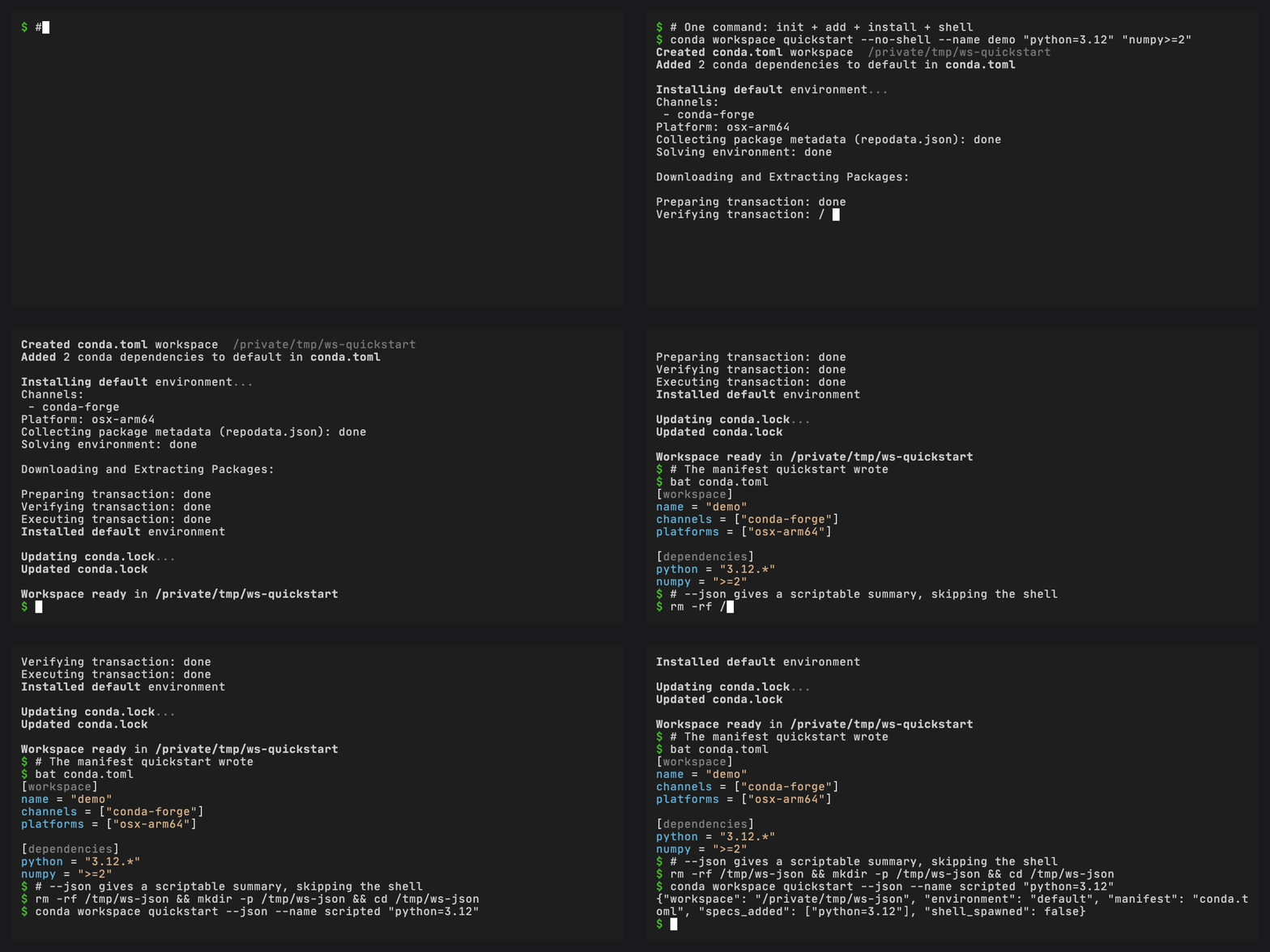
For projects that would rather skip writing a manifest by hand, conda workspace quickstart composes init, add, install, and shell into a single command. From an empty directory to an installed environment with an activated shell, in one step:
conda workspace quickstart python=3.14 numpy
--no-shell makes it CI-friendly, and --json returns a scriptable summary. See Your first workspace for the full walkthrough.
Why this exists
The conda ecosystem has tried to solve this before.
anaconda-project was the first tool to attach project-scoped conda environments to a manifest, with command runners, downloads, and platform variants baked in. conda-project is its community successor, layering conda-lock on top for reproducibility. conda-devenv takes a different angle: Jinja2 over environment.yml for composition and inheritance. Each of these still has a healthy user base and solves the problem its constituency cares about. What none of them share is a manifest format with each other, or with anything outside the conda ecosystem.
pixi reframed what a TOML workspace manifest could look like (composable features, named environments, platform targeting, a built-in task runner), and that schema is what conda-workspaces uses. The manifest itself is, by design, identical between the two tools.
What conda-workspaces adds is a way to drive that same manifest from inside a conda installation. Solving uses conda or libmamba (or conda-rattler-solver when installed). Installation uses conda's transaction code. PyPI dependencies, when present, are handled by conda-pypi. Lockfile reading and writing route through conda-lockfiles. A workspace ends up looking, on disk, exactly like a directory full of conda environments.
That makes the two tools comfortably complementary. Teams that prefer pixi's batteries-included Rust experience keep using pixi. Teams that already live in the conda ecosystem (with their own channels, mirrors, authentication, and condarc) get the same workspace ergonomics without swapping out the rest of the stack. The same pixi.toml can live in a shared repo and serve both groups.
The longer-term direction sketched in the Vision post is for the workspace model (conda.toml as the project format, workspaces as a first-class CLI concept, conda.lock as a community-owned lockfile) to ship as part of a future conda release. conda-workspaces is an early preview of that direction. Today it is a plugin install. The goal is that nothing about how an individual workspace is shaped has to change on the day that integration moves upstream.
What it does
One-command bootstrap
conda workspace quickstart (shown above) takes a project from "no manifest" to "installed environment" in one step: it picks a manifest format, drops a sensible starting conda.toml (or pixi.toml, or [tool.conda.workspace] in pyproject.toml), solves, installs, and writes conda.lock. --copy <path> clones an existing workspace's manifest instead of running init, which is the fastest way to spin up a sister project from a known-good template.
Day-to-day edits go through conda workspace add and conda workspace remove, which by default install into the affected environments and refresh conda.lock in one step. --no-install and --no-lockfile-update opt back into manifest-only changes, and --dry-run solves without touching disk. The full flow is documented under Add and remove dependencies.
Multi-environment workspaces with composable features
A feature is a reusable group of dependencies, channels, activation scripts, or environment variables. Environments compose features:
[feature.test.dependencies]
pytest = ">=8.0"
pytest-cov = ">=4.0"

[feature.docs.dependencies]
sphinx = ">=7.0"
myst-parser = ">=3.0"

[environments]
default = []
test = { features = ["test"] }
docs = { features = ["docs"] }
ci   = { features = ["test", "docs"] }
Each named environment is solved independently and installed under .conda/envs/<name>/. Cloning a repo is then all it takes to recreate every environment a project needs. See Environments for the full model.
PyPI dependencies in the same solve
PyPI packages live in their own table and resolve in the same solver call as conda packages, so a workspace can mix the two without a separate pip install step:
[dependencies]
python = ">=3.10"
numpy = ">=1.24"

[pypi-dependencies]
my-local-pkg = { path = ".", editable = true }
some-pypi-only = ">=1.0"

[feature.test.pypi-dependencies]
pytest-benchmark = ">=4.0"
This path requires conda-pypi (which maps PyPI names to their conda equivalents and handles wheel extraction) and conda-rattler-solver as the solver backend. Both are still under active development, so PyPI integration is the most experimental part of conda-workspaces today. The common cases work (declared specs, named PyPI packages, plus editable / git / URL specs handed off to conda-pypi's build system after the main solve), and rough edges are being filed down upstream. If conda-pypi is not installed, PyPI dependencies are skipped with a warning, so a workspace that does not declare any works on a stock conda. Full reference in PyPI dependencies.
Multi-platform conda.lock
conda workspace lock writes a single conda.lock that covers every platform every environment declares, not just the host. One file, one commit, one source of truth for cross-platform projects.
conda workspace lock
conda workspace lock --platform linux-64
conda workspace lock --platform linux-64 --platform osx-arm64
conda workspace lock --skip-unsolvable
Each platform's solve runs with conda pointed at the target platform rather than the host. That single switch picks the right channel repodata to fetch and makes conda's virtual package plugins (__linux, __osx, __win) report the target platform too, so a linux-64 lock generated on macOS sees the same world a linux-64 machine would. Tighter constraints come from CONDA_OVERRIDE_* or the [system-requirements] table when cross-compiling. Unknown platform names fail fast before any solver runs, so typos like lixux-64 get caught at parse time instead of after a 90-second metadata download.
conda workspace info exposes a Known Platforms row (and matching known_platforms JSON key) that surfaces the full set of platforms reachable through any feature, not just the workspace-level list. Full reference in Platform targeting.
conda.lock is a derivative of pixi.lock, which is itself derived from rattler-lock v6. It is not a standard yet. The plan is to take it through the conda CEP process so the format becomes a community-owned spec rather than a private detail of two project tools. In the meantime, the loader composes the upstream conda_lockfiles.rattler_lock.v6 converter via an in-memory version: 1 -> 6 swap, so reading and writing always go through the canonical implementation.
CI-split locking with --merge
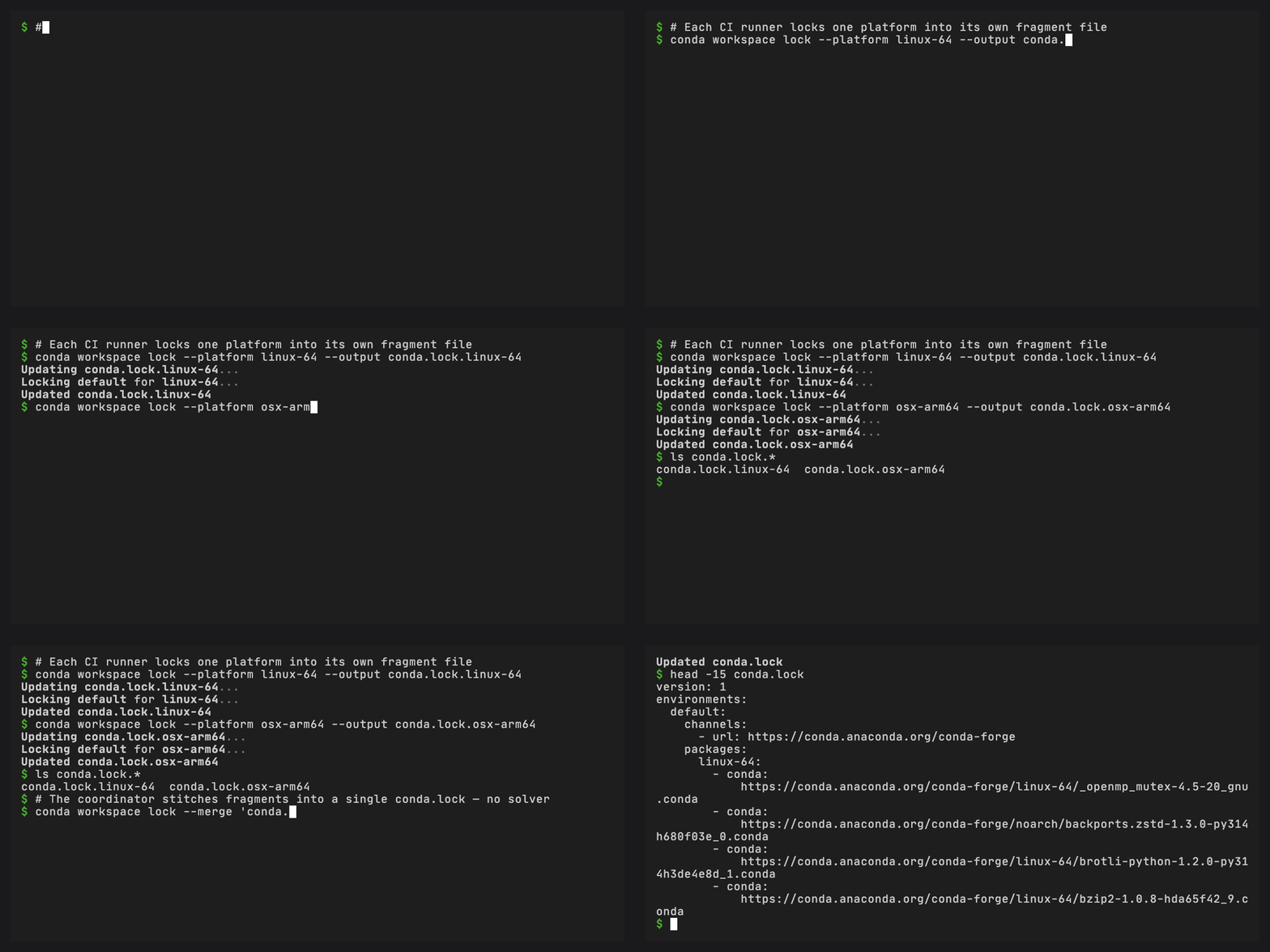
Solving every platform from a single CI job becomes the bottleneck as a workspace grows. The lock command is matrix-friendly: each runner emits one fragment with --output, and a coordinator job stitches them back together with --merge, with no solver runs.
# In each matrix job
conda workspace lock \
    --platform linux-64 --output conda.lock.linux-64
conda workspace lock \
    --platform osx-arm64 --output conda.lock.osx-arm64
conda workspace lock \
    --platform win-64 --output conda.lock.win-64

# On the coordinator: pure file-level merge, no solving
conda workspace lock --merge "conda.lock.*"
--merge validates schema version and per-environment channel agreement, rejects overlapping (environment, platform) pairs, and produces output that is byte-identical to a single-job conda workspace lock over the same inputs. That last part is the one that matters: the merged lockfile is indistinguishable from one produced sequentially, so caching, hashing, and "lockfile changed?" diffs all behave normally. The flag matrix is documented under CI-split locking, and the CI pipeline tutorial wires the same flow into GitHub Actions end-to-end.
Cross-format conversion
conda workspace export plugs into conda's conda_environment_exporters plugin hook. Every format reachable through conda export, plus anything a third-party plugin like conda-lockfiles registers, is reachable through conda workspace export and vice versa. conda-workspaces registers three of those exporters itself: conda-toml, pixi-toml, and pyproject-toml.
conda workspace export --file environment.yml
conda workspace export --format conda-toml --file conda.toml
conda workspace export --format pyproject-toml --file pyproject.toml
conda workspace export --from-lockfile --file env.conda-lock.yml
conda workspace export --from-prefix --no-builds --from-history
When the target file already exists, the pyproject-toml exporter splices the [tool.conda] subtree into the document and leaves the existing [project], [build-system], [tool.ruff], [tool.pixi], and friends untouched. Any stale [tool.conda] is replaced. Everything else survives. Full matrix in Export.
The reverse direction is conda workspace import. It detects the source format and writes a conda.toml next to it:
conda workspace import environment.yml
conda workspace import anaconda-project.yml
conda workspace import conda-project.yml
conda workspace import pixi.toml --dry-run
conda workspace import pyproject.toml --output conda.toml
The per-tool walkthroughs in the docs cover how each source format maps onto the workspace schema, including command and feature mappings, what carries over, and what does not: Coming from conda, Coming from conda-project, Coming from anaconda-project, and Coming from pixi.
Built-in task runner
conda task ships in the same plugin. The design is borrowed from pixi: task dependencies with topological ordering, per-platform overrides, input/output caching, Jinja2 templates with a conda.* context, and named arguments with defaults.
[tasks]
lint  = "ruff check ."
build = { cmd = "python -m build", inputs = ["src/**/*.py"], outputs = ["dist/*.whl"] }
test  = { cmd = "pytest {{ test_path }} -v", depends-on = ["build"] }

[target.win-64.tasks]
clean = "rd /s /q build"

[tasks.check]
depends-on = ["test", "lint"]
Tasks defined in a workspace manifest run in the workspace's default environment, and -e <env> targets a different one. Tasks in a manifest with no workspace section run in whatever conda environment is active, which is useful for adopting conda task in a project that is not ready for a full workspace yet. Each capability has a dedicated section in the docs:
Install and try it
conda-workspaces is a conda plugin, so a conda installation has to exist first. Installing into a conda base environment registers the conda workspace and conda task plugin subcommands. The standalone cw and ct shortcut commands are always installed and work without going through conda <subcommand> at all.
- conda
- mamba / micromamba
- pixi global
conda install --name base --channel conda-forge conda-workspaces
mamba install --name base -c conda-forge conda-workspaces
# or:
micromamba install --name base -c conda-forge conda-workspaces
pixi global install conda-workspaces
Then, in any directory:
conda workspace quickstart python numpy
That is it.
What it doesn't do
A few things to set expectations.
It is not a replacement for pixi. If a self-contained, batteries-included project tool with its own solver, runtime, and cache is the right fit, pixi is the better answer. conda-workspaces is for teams that already live in the conda ecosystem and want pixi-style project workflows without moving everything else.
It does not change how conda is configured. Channels, authentication, mirrors, proxy settings, and .condarc continue to behave exactly the way they do for any other conda command. There is nothing new to teach existing tooling about.
It does not invent a new lockfile schema. conda.lock is intentionally compatible with the rattler-lock family so that lockfiles can be inspected, shared, and (eventually) standardized through the CEP process.
It does not require any of this all at once. A conda.toml with just a [tasks] table is a valid file: tasks run in whatever conda environment is currently active, and workspace features can be added later. Most projects start there.
Get involved
conda-workspaces is a conda-incubator project. Contributions, bug reports, and feature requests are welcome:
- Documentation
- GitHub repository
- Issue tracker
- Migration guides for users coming from conda, conda-project, anaconda-project, or pixi
Acknowledgements
The workspace and task design in conda-workspaces is directly inspired by the work of the prefix.dev team on pixi. Composable features, named environments, platform targeting, task dependencies, caching, and template variables all come from their playbook. Many thanks for it, and for keeping the manifest format open enough that two tools can share it.
Thanks also to the anaconda-project and conda-project teams for laying the groundwork on project-scoped conda long before this plugin existed, and to the conda-lock maintainers for years of work on cross-platform conda lockfiles (the idea conda.lock builds on, even though the on-disk format goes through rattler-lock). Finally, thanks to everyone who has filed issues, tested early releases, and pushed the design forward in the open.